
- 2026.07.28 The Awkward Problems in Calendar-Based Attendance Tracking
- 2026.07.27 Why AI Sales Emails Get No Replies
- 2026.07.26 How One Shared Sheet Link Leaks Company Data
- 2026.07.25 Make.com Subscription vs Free Apps Script: Which Is Actually Cheaper?
- 2026.07.24 Why Internal Dashboards Are Ignored After Six Months
- 2026.07.23 Bad Form Auto-Replies Damage Customer Trust
- 2026.07.22 The Moment Free Automation Hits a Paid Plan
- 2026.07.21 Why Cutting Prompts to Save AI Cost Can Make Things Worse
- 2026.07.20 Spreadsheet Inventory Numbers Do Not Match for a Reason
- 2026.07.19 Why Vibe-Coded Apps Script Turns Into Trash After Three Months
- 2026.07.18 Why Google Calendar Booking Systems Double-Book
- 2026.07.17 Why a Stack of SaaS Tools Does Not Raise Revenue
- 2026.07.14 Why Google Forms Data Turns Messy in Days
- 2026.07.13 ChatGPT API Costs Quietly Leak Money If You Do Not Count Them
- 2026.07.12 The Permission Trap in Spreadsheet Approval Systems
- 2026.07.11 Why Three No-Code Tools Got Replaced by One Apps Script
- 2026.07.10 Where Free Google Apps Script Automation Starts Leaking Money
- 2026.06.20 Cut Your Monthly SaaS Bill: Rent vs Own Your Automation
- 2026.06.19 How Much Does Adding AI Cost? The One Exception to Zero-Cost Automation
- 2026.06.19 Automating Your Work with Google Apps Script — The Complete Guide
- 2026.06.16 How a Multi-User Inspection App Is Different You are here
- 2026.06.10 Inventory in Google Sheets: How Far Automation Goes
- 2026.06.08 The Truth About Zero Upkeep: Why It's Free, and the Exceptions
- 2026.06.06 Outsource vs Build vs SaaS: Compared by Cost
How a Multi-User Inspection App Is Different
A single-user app just needs a screen. An inspection app where several people write the same data hinges on sharing, collisions, and reports. Even so, narrow the scope and you can start with GAS, Sheets, and Drive at no running cost. There's a public demo you can try yourself.
Bottom line first: a multi-user inspection app doesn’t have to be a giant platform. You can start with a small business tool that connects a paper inspection sheet to phone entry, photo evidence, shared records, and a report. With just Google Apps Script, Sheets, and Drive, the first version can be plenty simple — and run at no cost.
There’s a demo I built and made public. Open it on your phone and you can go all the way from picking a facility to exporting an A4 report.
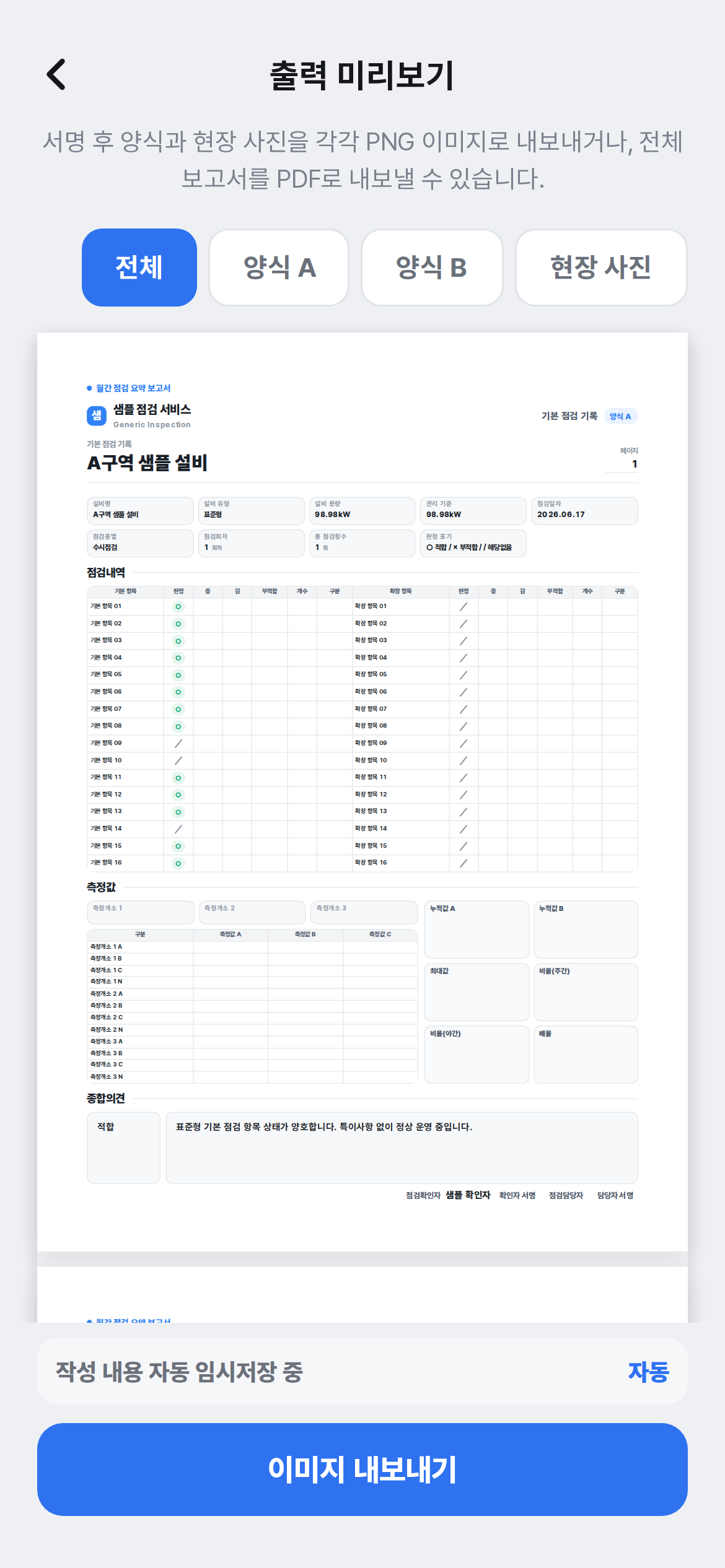
This post isn’t a release of any real app from a specific site. It’s a pattern trimmed down to a publishable level. The industry, location, equipment names, threshold values, and operational figures are intentionally left out.
How it differs from a single-user app
Good Thought Card is an app one person opens to leave notes on their own device. The data is small, and a failure doesn’t stop the business.
A multi-user inspection app is a different animal.
- It isn’t used alone. Several inspectors write the same data at the same time. Who left what, and when, has to be visible.
- You can’t save carelessly. If two people save at the same instant, or someone reconnects and taps again, records must not collide or go in twice.
- Photos become evidence. Certain items must not be submitted without a photo.
- A report is required. It can’t end at entry; it has to continue to a sheet, a PDF, an image.
So even though the screen looks simple, the data behind it matters more.
Trimmed down, you can build it like this
Trimmed to a public demo, this much of the core flow is enough.
- Today’s inspection list: show only the facilities the assignee needs.
- Inspection entry screen: leave a status like Normal, Caution, or Action Needed, plus notes. Saves as a draft automatically while you work.
- Photo attachment: for items that require a photo, block submission if it’s missing.
- Report / status screen: export an A4 report, and see monthly and regional progress.
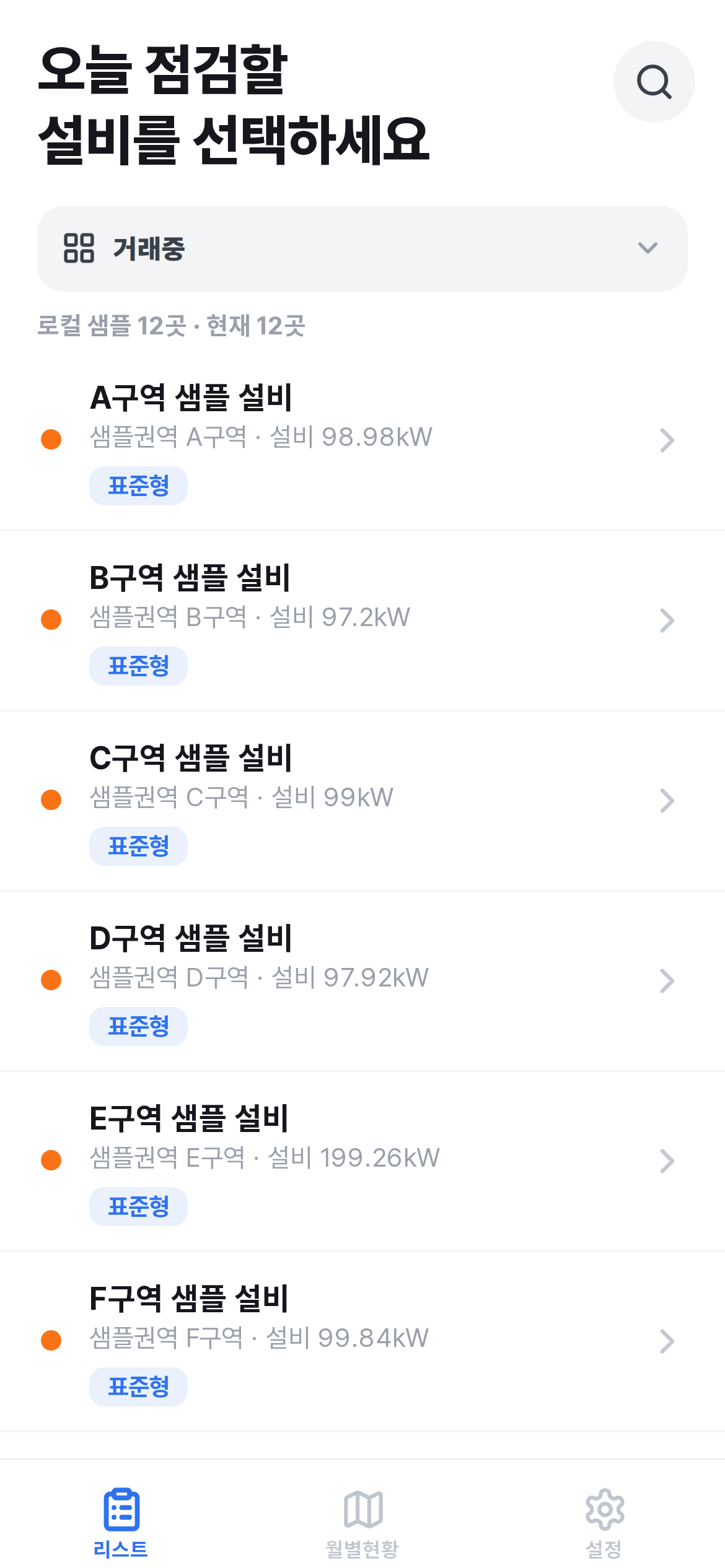
Even this much can bind together the back-and-forth between a paper inspection sheet, a photo album, a messenger report, and a spreadsheet cleanup into one line.
The complicated parts
First, several people write the same data. If two people save at the same instant, records can break. Reconnect and tap again, and a duplicate appears. This has to be blocked in the save method, not the screen. (The fix from a development angle, code and all, is in the technical note.)
Second, a photo is evidence, not a file. Upload the file to Drive, and leave the link, time, item, and submitter in the sheet. You have to keep photos bound so they don’t end up scattered on their own later.
Third, you need a status flow. Statuses like Inspection Complete, Awaiting Review, and Action Needed have to be clear. Without this, the app is just a pretty entry form, and the field ends up confirming things over messenger again.
Fourth, history has to remain. Who submitted when, and what changed, has to remain. Even without a complex audit system, a minimal history builds business trust.
Why GAS fits
For an app like this, building the first version fast and small is what matters.
- No installation. Open the link and write from your phone right away.
- The sheet acts as the shared database. It manages inspection records, submission status, and completion as tables.
- Drive becomes the photo store. No need to build a separate file server.
- Report export works. Export the A4 preview as an image and a PDF.
- No server running cost. At a small scale, you run it without renting a separate server.
This is the point that matters. GAS isn’t a “cheap, slapdash stopgap” — scope it exactly and it’s a way to bind several people’s work together without it breaking.
There are cases where it doesn’t fit
Not every inspection app is a fit for GAS.
- When the system itself has to make the legal safety judgment
- When fully offline and automatic sync are hard requirements
- When thousands of concurrent submissions a day pile up
- When permissions, audit, and retention policies across multiple organizations are strict
- When you need real-time two-way integration with an existing ERP or facility-management system
In those cases, it’s better to consider a dedicated backend or an external database from the start. GAS is strong at binding field records and work flows lightly. It shouldn’t be described as a tool that stands in for safety judgment or a large-scale operational system.
What to settle before you build
For an inspection app, settle the work flow before the feature list.
- How many people enter how many records a day? Is anyone writing at the same time?
- Is a photo required or optional per item?
- Who reviews after submission? If it’s rejected, who handles it again?
- Should the final report be a sheet, a PDF, or an image?
- How many months or years of history must be kept?
With answers to these questions, the first version can be smaller than you’d think. Rather than packing in every feature from the start, just move the flow the field truly needs into an app first.
One-line summary
If Good Thought Card shows that “even a small public app can be built cleanly with GAS,” the inspection app shows that “even work that several people share can be started with GAS, without breaking, as long as you cut the scope well.”
What matters isn’t making it look like a giant system. It’s reducing what the field misses, leaving records safely, and carrying through to the report. For work that narrow and clear, a small tool is the most practical.
Questions?
Wondering “could our field inspections be bound together like this?” — just ask. I’d nudge you to build it yourself, but if you’re short on time, I also build these. You can also open the CheckReport demo on your phone first.
Frequently asked questions
- Does a GAS-based inspection app come with a server hosting bill?
- At the scale of a small field inspection operation, you can run it entirely within Google's automation layer — Apps Script, Sheets, and Drive — with no separate server cost. That changes if you need thousands of concurrent submissions a day or real-time two-way integration with an existing ERP.
- If two inspectors save at the same moment, will records collide or disappear?
- Collisions are blocked in the save method, not the screen. With a proper lock and duplicate-prevention design in place, records will not overlap whether two people save simultaneously or one user taps again after a dropped connection.
- What information should I have ready before building a first-version inspection app?
- Gather how many entries a day and how many simultaneous users there are, whether photos are required per item, who reviews and handles rejections, what form the final report should take (sheet, PDF, or image), and how long history must be kept. Having those answers narrows the scope and speeds up the design and the build.
- 2026.07.28 The Awkward Problems in Calendar-Based Attendance Tracking
- 2026.07.27 Why AI Sales Emails Get No Replies
- 2026.07.26 How One Shared Sheet Link Leaks Company Data
- 2026.07.25 Make.com Subscription vs Free Apps Script: Which Is Actually Cheaper?
- 2026.07.24 Why Internal Dashboards Are Ignored After Six Months
- 2026.07.23 Bad Form Auto-Replies Damage Customer Trust
- 2026.07.22 The Moment Free Automation Hits a Paid Plan
- 2026.07.21 Why Cutting Prompts to Save AI Cost Can Make Things Worse
- 2026.07.20 Spreadsheet Inventory Numbers Do Not Match for a Reason
- 2026.07.19 Why Vibe-Coded Apps Script Turns Into Trash After Three Months
- 2026.07.18 Why Google Calendar Booking Systems Double-Book
- 2026.07.17 Why a Stack of SaaS Tools Does Not Raise Revenue
- 2026.07.14 Why Google Forms Data Turns Messy in Days
- 2026.07.13 ChatGPT API Costs Quietly Leak Money If You Do Not Count Them
- 2026.07.12 The Permission Trap in Spreadsheet Approval Systems
- 2026.07.11 Why Three No-Code Tools Got Replaced by One Apps Script
- 2026.07.10 Where Free Google Apps Script Automation Starts Leaking Money
- 2026.06.20 Cut Your Monthly SaaS Bill: Rent vs Own Your Automation
- 2026.06.19 How Much Does Adding AI Cost? The One Exception to Zero-Cost Automation
- 2026.06.19 Automating Your Work with Google Apps Script — The Complete Guide
- 2026.06.16 How a Multi-User Inspection App Is Different You are here
- 2026.06.10 Inventory in Google Sheets: How Far Automation Goes
- 2026.06.08 The Truth About Zero Upkeep: Why It's Free, and the Exceptions
- 2026.06.06 Outsource vs Build vs SaaS: Compared by Cost