
- 2026.07.29 What Breaks When Apps Script Projects Sprawl
- 2026.07.16 Why a Daily Apps Script Trigger Suddenly Stops
- 2026.07.15 What Breaks When Customer Data Lives in Browser Storage
- 2026.07.07 When the Browser Throws Your Data Away: The Green Checkmark Lies You are here
- 2026.07.07 Installed ≠ Working: the Backup Trigger Never Ran Once
- 2026.07.07 GAS Has No Gradual Rollout: One 'Correct' Check Locks Out Every User
- 2026.07.07 Sheets Turns Your Text Into a Date: When '2026-06' Blocks Completion Forever
- 2026.06.18 An App Where Many Write to One Sheet: Concurrency, Duplicates, and Export Design
- 2026.06.12 Don't Read Cells One at a Time: Service Calls Are the Real Cost
- 2026.06.11 Stuffing JSON or Images into a Sheet Cell Will Break It
- 2026.06.10 One Deploy Setting Decides Your Security Model: Execute as / Access
- 2026.06.09 The 6-Minute GAS Limit: Chunk and Resume Before It Kills You
- 2026.06.08 PropertiesService Is Not a Database: the 9KB Wall
- 2026.06.07 Why Saving a Screen as an Image Freezes on Mobile
- 2026.06.06 Concurrent Writes to the Same Sheet Break: LockService and the 30-Run Ceiling
- 2026.06.05 Your /exec URL Must Not Change on Every Redeploy
- 2026.06.04 External Calls Fail Sometimes: Exponential Backoff and a Retry Budget
- 2026.06.03 HtmlService Apps: Shell First, Then Async Load and Mobile Back
- 2026.06.02 When to Graduate from GAS: Limit Signals and Moving to an External DB
- 2026.06.01 Adding a Brain and an Engine Room to GAS: Vertex AI and Cloud Run
When the Browser Throws Your Data Away: The Green Checkmark Lies
Mobile localStorage drops data silently when it fills up — but the 'saved' flag stays, so a Done check shows with no data. Which store to use for what, keeping large bodies in IndexedDB, an integrity check on open, and cutting eviction with storage.persist().
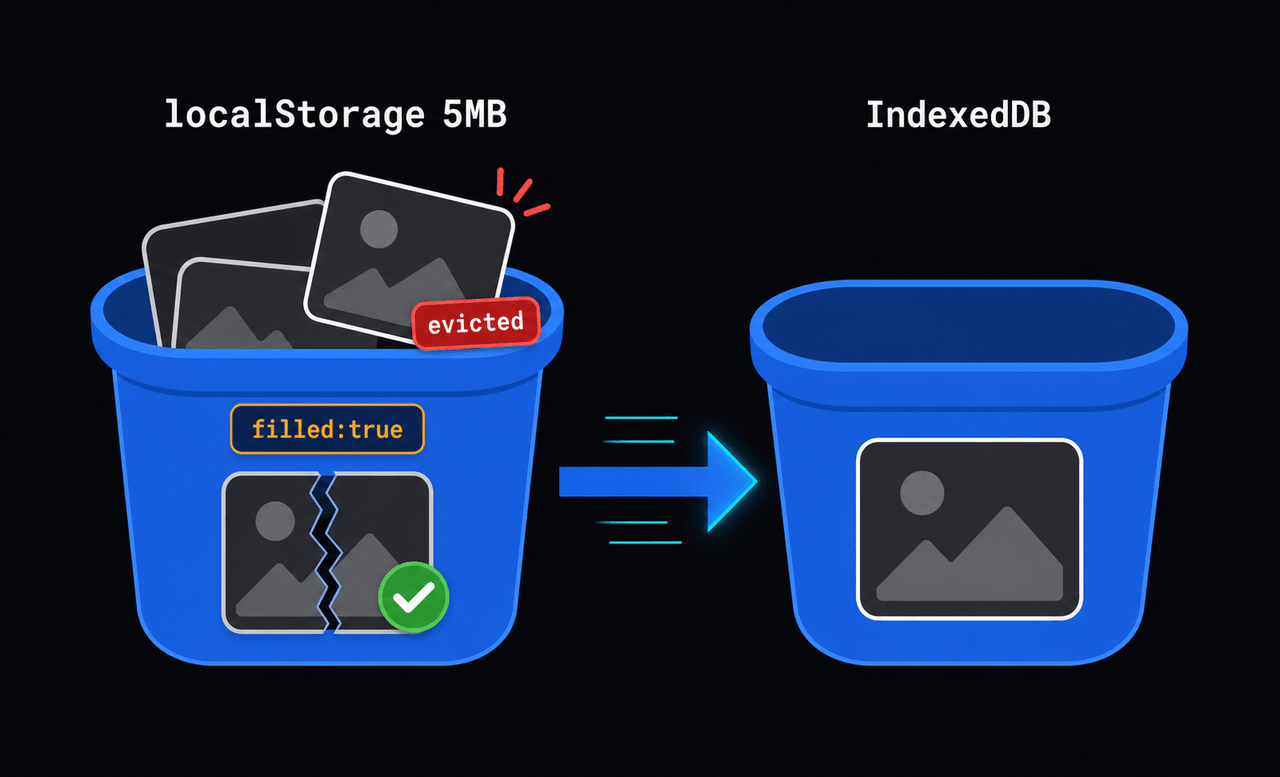
Browser storage is not durable — it throws data away and leaves the “saved” flag behind. Put a photo in mobile localStorage and, when the quota fills, the browser silently drops the body and keeps only filled: true. So the app draws a green check over a broken image and lies to the user.
Why it matters
The user assumes it’s done and moves on — with no data behind it. In the field, that’s the moment they lose the chance to re-shoot the photo. And because it’s a “failure that looks like success,” not an error, the report comes late.
Where to put what
Browser storage isn’t one thing. The stores differ in size and behavior, and the wrong choice disappears silently.
| Store | Size | Behavior | Use for |
|---|---|---|---|
| localStorage | ~5MB | synchronous, strings only | small flags / settings |
| sessionStorage | ~5MB | tab-scoped, gone on close | one-off temporary |
| IndexedDB | hundreds of MB+ | async, stores Blobs | photos / files / draft bodies |
| Cache API | large | async | network response cache |
The rule: large bodies (photos, binaries) go to IndexedDB; only small flags go to localStorage.
The wrong way: bodies in localStorage
// A big dataURL in localStorage → throws over quota, or evicts other items
try {
  localStorage.setItem("photo:" + id, bigDataUrl);   // 1–3MB
} catch (e) {
  // QuotaExceededError — but another photo may already have been pushed out
}
localStorage.setItem("photo:" + id + ":filled", "true"); // flag survives with no body
filled=true succeeded while the body write failed — the instant those two lines diverge, you have a false check.
The fix: large bodies in IndexedDB, state from the body’s existence
Store bodies in IndexedDB (async), and compute state from whether the body is actually present, not from the flag.
function openDb_() {
  return new Promise((resolve, reject) => {
    const open = indexedDB.open("drafts", 1);
    open.onupgradeneeded = () => open.result.createObjectStore("photos");
    open.onsuccess = () => resolve(open.result);
    open.onerror = () => reject(open.error);
  });
}

function idbPut_(key, blob) {                       // store a body
  return openDb_().then((db) => new Promise((res, rej) => {
    const tx = db.transaction("photos", "readwrite");
    tx.objectStore("photos").put(blob, key);
    tx.oncomplete = () => res(true);
    tx.onerror = () => rej(tx.error);
  }));
}

function idbGet_(key) {                             // read a body (undefined if gone)
  return openDb_().then((db) => new Promise((res, rej) => {
    const req = db.transaction("photos").objectStore("photos").get(key);
    req.onsuccess = () => res(req.result);
    req.onerror = () => rej(req.error);
  }));
}

// Decide state from "is the body actually there," not from the flag
async function photoState_(key, meta) {
  const body = await idbGet_(key);
  if (body) return "filled";
  if (meta && meta.filled) return "missing-body";   // flag survived, body evicted
  return "empty";
}
Run an integrity check on open — tell the user what’s gone
On app open, reconcile flags against bodies and flip any body-less item to missing-body.
// On startup: find items whose flag says filled but have no body, mark "re-attach"
async function reconcileDrafts_(metas) {
  const missing = [];
  for (const m of metas) {
    if (m.filled && !(await idbGet_(m.key))) {
      m.state = "missing-body";
      missing.push(m.key);
    }
  }
  if (missing.length) notifyUser_(missing.length + " photos need to be re-attached");
  return metas;
}
Where you can, check headroom and request persistence to lower the eviction odds.
// Check headroom + request persistent storage (less likely to be auto-cleared; not a guarantee)
const { usage, quota } = await navigator.storage.estimate();
if (navigator.storage.persist) await navigator.storage.persist();
Easy to miss
- Don’t trust the flag and the data separately. “Saved” is intent, not fact. Add a third state like
missing-bodyand decide from the body’s existence. - localStorage is synchronous and small (~5MB). Large values throw or fail silently. Photos and binaries go to IndexedDB.
- Don’t draw a false success in the UI. A “done” with no body is a red “re-attach,” not a green check.
- iOS Safari clears on inactivity. Under ITP, going unvisited for a while wipes script storage. The more it’s a PWA, the more
persist()+ an integrity check on open are mandatory.
Deeper: split drafts across two stores
Keep a draft’s metadata and cursor in localStorage, and its photo/binary bodies in IndexedDB. Delete the local body only after the server save confirms; until then, decide state from the body’s existence. One line to keep: decide state from the data’s existence, not the “saved” flag.
Frequently asked questions
- Why did the photo I saved to localStorage disappear?
- localStorage is small — about 5MB. When one compressed photo exceeds the quota, the browser either throws QuotaExceededError or silently fails to store it. Keep large bodies like photos and files in IndexedDB.
- Why is my PWA draft empty when I reopen it?
- Browsers can evict an entire origin's storage under space pressure, and iOS Safari clears data after a period of no visits. Keep bodies in IndexedDB and run an integrity check on open so you can tell the user what went missing.
- Why does a Done check show when there's no data?
- Only the 'saved' flag survived while the actual body was evicted. Trusting the flag and the data separately draws exactly this false success. Decide state from whether the body really exists.
- Can I stop the browser from clearing my data?
- navigator.storage.persist() requests persistent storage, which makes your data far less likely to be auto-evicted under pressure. It's not a guarantee, so still run an integrity check on open.
- 2026.07.29 What Breaks When Apps Script Projects Sprawl
- 2026.07.16 Why a Daily Apps Script Trigger Suddenly Stops
- 2026.07.15 What Breaks When Customer Data Lives in Browser Storage
- 2026.07.07 When the Browser Throws Your Data Away: The Green Checkmark Lies You are here
- 2026.07.07 Installed ≠ Working: the Backup Trigger Never Ran Once
- 2026.07.07 GAS Has No Gradual Rollout: One 'Correct' Check Locks Out Every User
- 2026.07.07 Sheets Turns Your Text Into a Date: When '2026-06' Blocks Completion Forever
- 2026.06.18 An App Where Many Write to One Sheet: Concurrency, Duplicates, and Export Design
- 2026.06.12 Don't Read Cells One at a Time: Service Calls Are the Real Cost
- 2026.06.11 Stuffing JSON or Images into a Sheet Cell Will Break It
- 2026.06.10 One Deploy Setting Decides Your Security Model: Execute as / Access
- 2026.06.09 The 6-Minute GAS Limit: Chunk and Resume Before It Kills You
- 2026.06.08 PropertiesService Is Not a Database: the 9KB Wall
- 2026.06.07 Why Saving a Screen as an Image Freezes on Mobile
- 2026.06.06 Concurrent Writes to the Same Sheet Break: LockService and the 30-Run Ceiling
- 2026.06.05 Your /exec URL Must Not Change on Every Redeploy
- 2026.06.04 External Calls Fail Sometimes: Exponential Backoff and a Retry Budget
- 2026.06.03 HtmlService Apps: Shell First, Then Async Load and Mobile Back
- 2026.06.02 When to Graduate from GAS: Limit Signals and Moving to an External DB
- 2026.06.01 Adding a Brain and an Engine Room to GAS: Vertex AI and Cloud Run