
I Vibe-Coded a Real GAS App — the Demo Was Fine, and the Field Broke Everything
AI built me a field-inspection app on GAS. The demo ran fine. Then one deploy button locked out every field worker, Sheets swapped my text for a date, and a green checkmark lied. The tiny bugs I fixed all day — and what to watch for before you vibe-code on GAS.
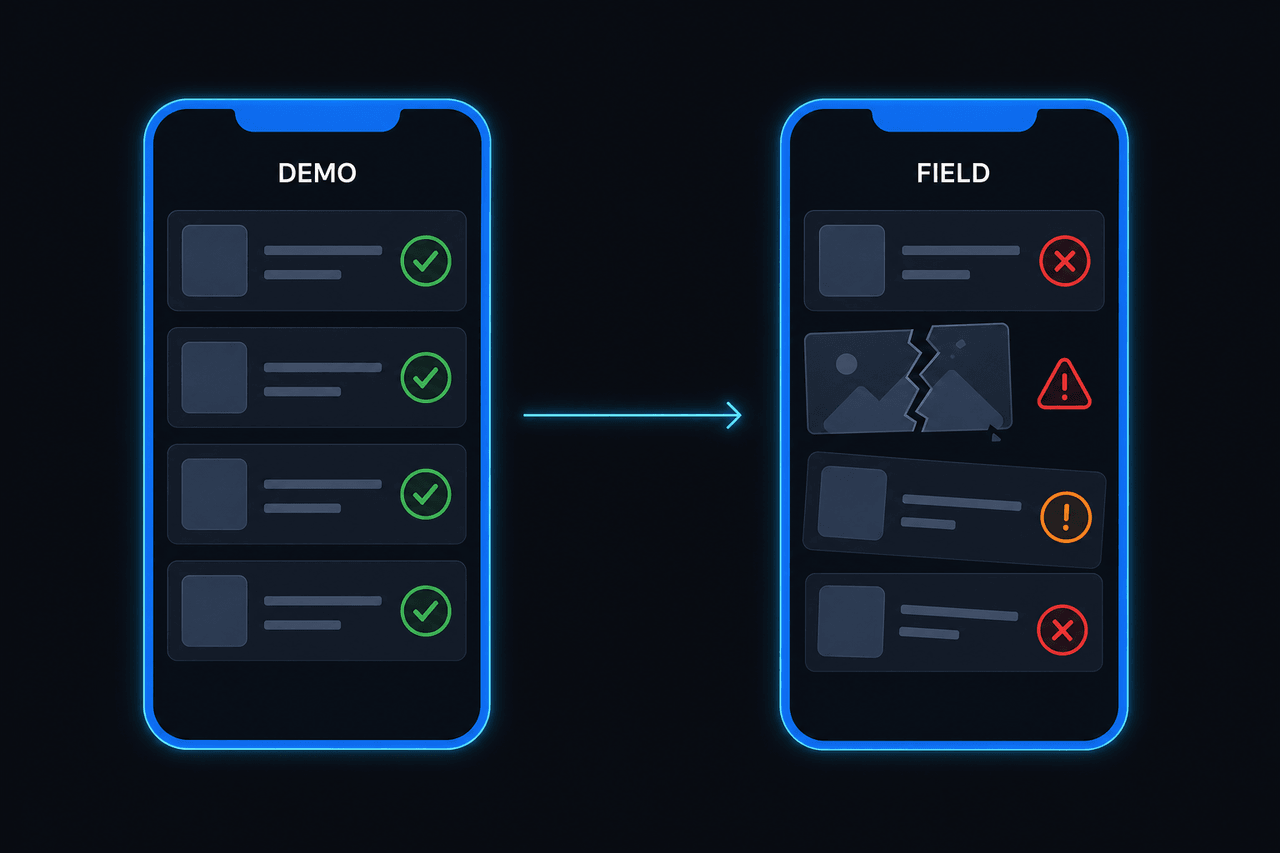
Bottom line first: I had AI build a field-inspection app on GAS. The demo ran fine. Then the client — who doesn’t code — started using it in the field, and it wasn’t the big things that fell over. The small ones did, one by one. Those tiny bugs I chased all day are, it turns out, a map of what you need to know before you build anything on GAS — especially when you vibe-code.
AI is great at code where “the demo runs.” The trouble is everything outside GAS’s happy path — the deploy model, Sheet types, browser storage, execution limits. What breaks there isn’t a code bug; it’s not knowing the runtime. This post walks the 6 landmines I actually stepped on today, in order.
What the app was
A mobile web app a field worker uses to inspect sites out in the field from their phone. The stack is a pure vibe-coding stack — the screen is a single index.html served by HtmlService, data lives in Google Sheets, photos in Drive, the whole thing wrapped as a PWA on Cloudflare. The client doesn’t code. So bug reports don’t arrive as “error 500” — they arrive as “the photo looks broken” and “the Done button won’t press.” Translating those into code, one by one, was the whole day.
1. “I uploaded it” — but nothing shipped, and the moment it did, the field locked out
Two things landed at once.
First, clasp push said “already up to date” while users kept seeing the old screen. On GAS, push only uploads source; deploy cuts the version. They’re separate steps.
clasp push     # only uploads source — users still see the old screen
clasp deploy   # this is when a new version reaches users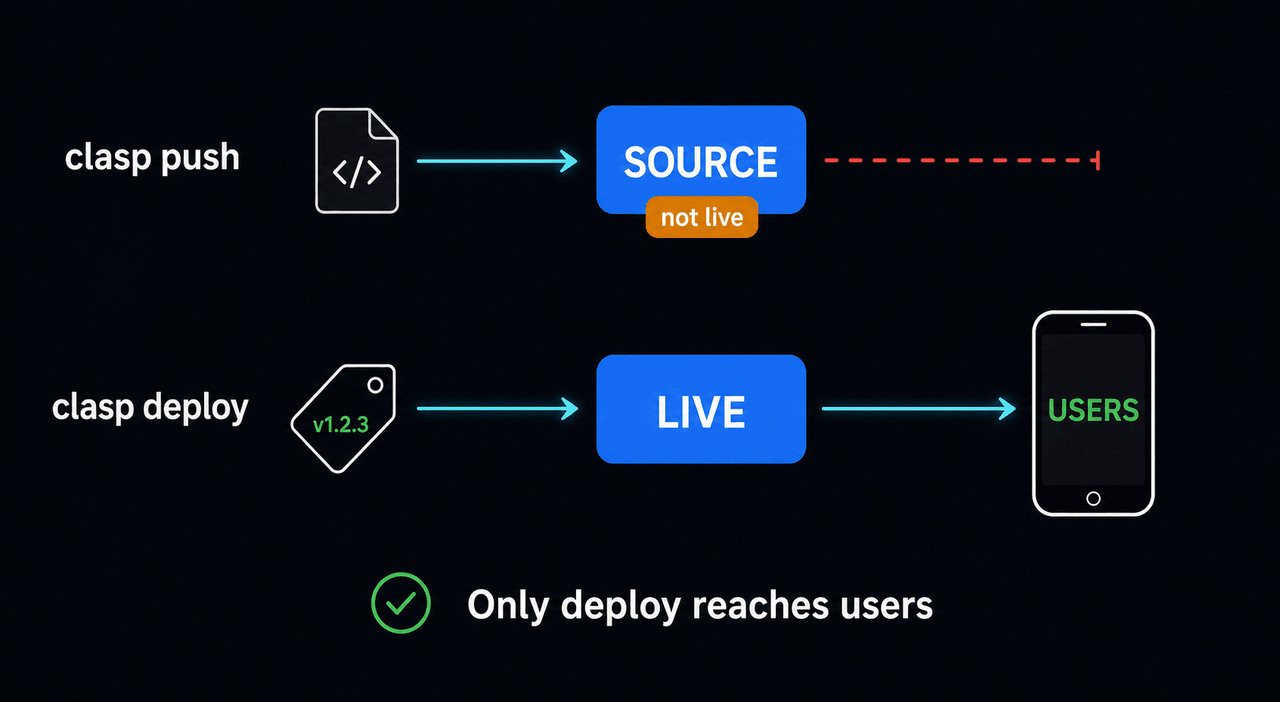
Pushing and assuming “it’s live” is the classic vibe-coding mistake. Ask AI to “deploy it” and it often runs push and stops — whether it actually went live is on you to check.
Then the real incident. In the name of “hardening,” I added a session check (requireApprovedSession_) and deployed. All local tests passed. But the PWA already installed on field phones doesn’t send that session token. The instant I deployed, every history lookup in the field failed with An approved app session is required. GAS deploys have no canary — a promote goes to 100% the moment you hit it.
I rolled back to the previous version that night and re-shipped the new check as a three-state mode so old clients wouldn’t break.
// Ship a newly-enforced check with the default at compat — it can't break old clients
if (ok) return;
if (mode === "compat") return;                 // pass (protect old clients)
throw new Error("APP_SESSION_REQUIRED"); // block only when enforcing2. Sheets swapped my ‘2026-06’ for a date
Client: “If I enter a June 30 inspection on July 1, the Done button never works.”
The culprit was Sheets. Put "2026-06" in a cell and Google Sheets silently coerces it from text into a Date.
// save, output, and completion each read the same cell differently
row[COL.month]              // you thought "2026-06", but it can be a Date
new Date(row[COL.month])    // a Date here, a string there → the three disagree
The save, output, and completion paths each computed “which month is this?” differently, and entering yesterday’s date made the three disagree — so completion was rejected forever. It’s the classic shape of AI-written code: each function is individually “reasonable,” but nobody knew Sheets changes the type, so the whole thing drifts out of sync.
3. The green checkmark was lying
Client: “The photo looks broken, but there’s a green Done check next to it.”
This one was unsettling. Mobile browser localStorage is small. When one compressed photo exceeds the quota, the browser silently drops the photo body and keeps only the filled: true flag we saved alongside it. So the app ended up “filled with no body,” drawing a green check over a broken image — lying to the user. I moved photo bodies into IndexedDB, and made a missing body render a red “re-attach required” tile instead of a green check.
4. The server was 4 minutes deep — and the phone gave up at 60 seconds
GAS force-kills a single execution at 6 minutes. So I put a 4.5-minute soft budget on output generation, and on overflow it skips what’s already saved and resumes. But on a slow field network the client gave up at 60 seconds, showed “failed,” and started re-uploading the whole thing — while the server was still working fine.
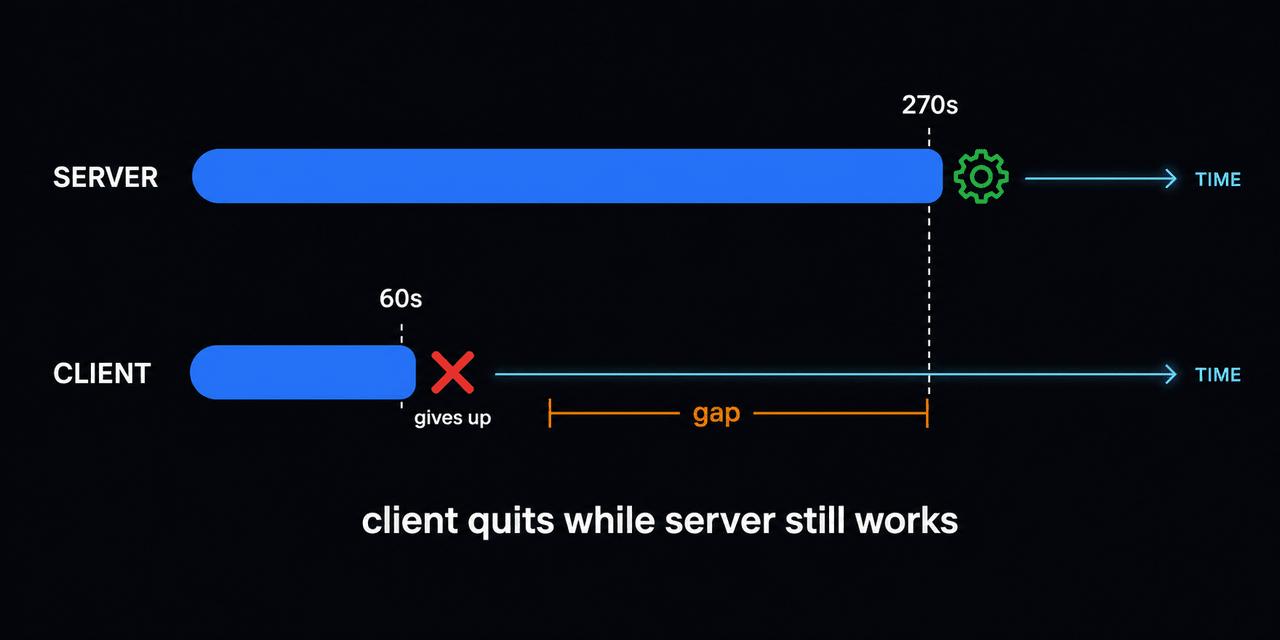
When the server budget (270s) and the client timeout (60s) don’t match, the slower the network, the slower it gets: a spiral. AI just picks a round client timeout (60s) and never reasons about how many seconds the server actually works for.
5. The backup was “installed” — and had never run once
This is the scariest one. The backup code existed. The trigger was installed. And there was not a single success on record. appsscript.json was missing one scope — script.scriptapp — so the trigger silently never fired. No error. It just didn’t run. “The code exists” and “it actually runs” are completely different claims. From that day, a backup counts as alive only by its last successful run time, never by “I installed it.”
6. And then the whole list just vanished
A few days earlier, the master list sheet’s data vanished wholesale into #REF!. I never fully found the root cause, but the trigger was clear — two production deploys from an uncommitted working tree. The only recovery path was Google Sheets’ native version history, which guarantees nothing. The reason this project now has a deploy preflight (refuse to deploy on a dirty tree) and recorded deploy evidence is entirely this one day.
Five of the six above weren’t “the code was wrong” — they were “I didn’t know the GAS runtime.” And that’s exactly the part AI can’t fill in for you.
So, what to watch before you vibe-code on GAS
A checklist you can paste straight into your project.
- Deploy ≠ push.
clasp pushonly uploads source;deploycuts the version that reaches users. If you had AI “deploy,” confirm it actually went live. And a promote is instant and global, so always record the last safe version. - New checks start in compat. If clients are already deployed, ship any newly-enforced gate as compat → warn → enforce. Ship straight to enforce and you lock out every user. Promote to enforce based on data — old-client hits hitting zero — not “it’s probably fine by now.”
- Don’t trust a Sheet as a database. Dates, leading-zero numbers, long IDs — Sheets changes the type. Pin text to a text format on write; guard for
[object Date]on read. Read values like a month through one normalization function. - Don’t trust the saved-flag and the data separately. Browser storage drops data silently when the quota fills. Large bodies in IndexedDB; decide state from the body’s existence; reconcile on open so you can flag what’s gone.
- Client timeout > server budget. Chunk and resume inside the 6-minute wall, but don’t let the client give up before the server does. Make retries “skip what’s done.”
- Don’t trust “installed” — demand a heartbeat. Scopes, triggers, and backups fail silently. Run it once right after install to confirm success, and count something as alive only by its last successful run.
- No prod deploy from a dirty tree. Commit, record the previous version, then deploy. A code rollback can’t undo corrupted Sheet data.
In one line
Running in a demo and surviving in the field are different things. AI gives you the first half in hours, but GAS’s deploy model, Sheet types, browser storage, and execution limits only get filled in by you. The landmines I stepped on all day are exactly that list.
Questions?
Want a read on where your project will break? Just ask — this app got fixed one landmine at a time too. For the full picture → Vibe Coding 101; to deploy what you built → How do you deploy from localhost?.
Frequently asked questions
- What breaks most often when building an app on GAS?
- It's rarely the code itself — it's the GAS runtime. A deploy goes to 100% of users instantly (no canary), so a new check can lock out already-installed clients; Sheets coerces text into dates; browser storage silently drops data. AI-written code doesn't know these traps.
- Does building with AI (vibe coding) reduce these problems?
- AI is especially prone to missing them. It quickly writes code where the demo runs, but it has no model of already-deployed clients, the 6-minute execution cap, or Sheets type coercion. Running in a demo and surviving in the field are different things.
- I ran clasp push but nothing changed — why?
- push only uploads source; deploy cuts an actual versioned web app. Even when push says 'already up to date,' users still get the old version. Deploying is two separate steps: push, then deploy.
- What must I check before deploying?
- Never deploy to production from an uncommitted working tree. A deploy hits every user instantly, so record a rollback pointer (the last safe version), and ship any newly-required check in a compat mode first so it can't brick existing clients.