
Vibe Coding 101: Build with AI, Auto-Deploy Free on Cloudflare
Wire an AI coding agent into clasp, Cloudflare, and gws-cli and you can mass-produce small owned tools at near zero cost, auto-deployed. A 5-minute example (form→sheet→email), the auto-deploy script, real cost numbers, the traps, and where a human must stay in the loop — no secrets held back.
Bottom line first: instead of renting a subscription every month, build a small tool once and own it — and don’t hand-write it all. Run a loop where the AI writes the code → clasp and wrangler deploy it → it goes live on Cloudflare and Apps Script, at near zero cost, factory-style. This post gives away the entire setup: a 5-minute example, the auto-deploy script, real cost numbers, the traps, and where a human must stay in the loop.
The AI writes code, the CLI deploys, you only review and approve. Once this loop turns, a small tool ships in hours, not days. Hosting is free on Cloudflare, the backend lives inside your Google account — upkeep is near zero.
The big picture: the AI build loop
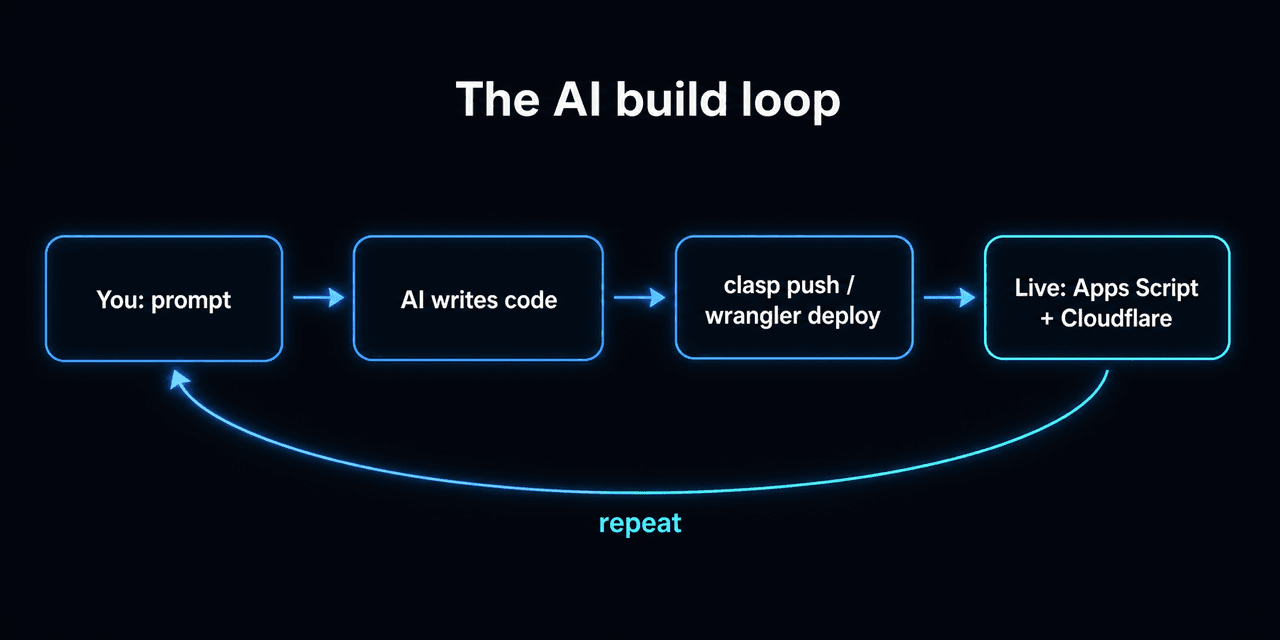
You prompt → the AI writes code → clasp push / wrangler deploy ships it → it’s live on Apps Script and Cloudflare → around again for the next feature. The shorter each turn (one feature), the less slop piles up and the faster it spins. This blog is the proof — an AI drafts the posts and wrangler auto-deploys them to Cloudflare.
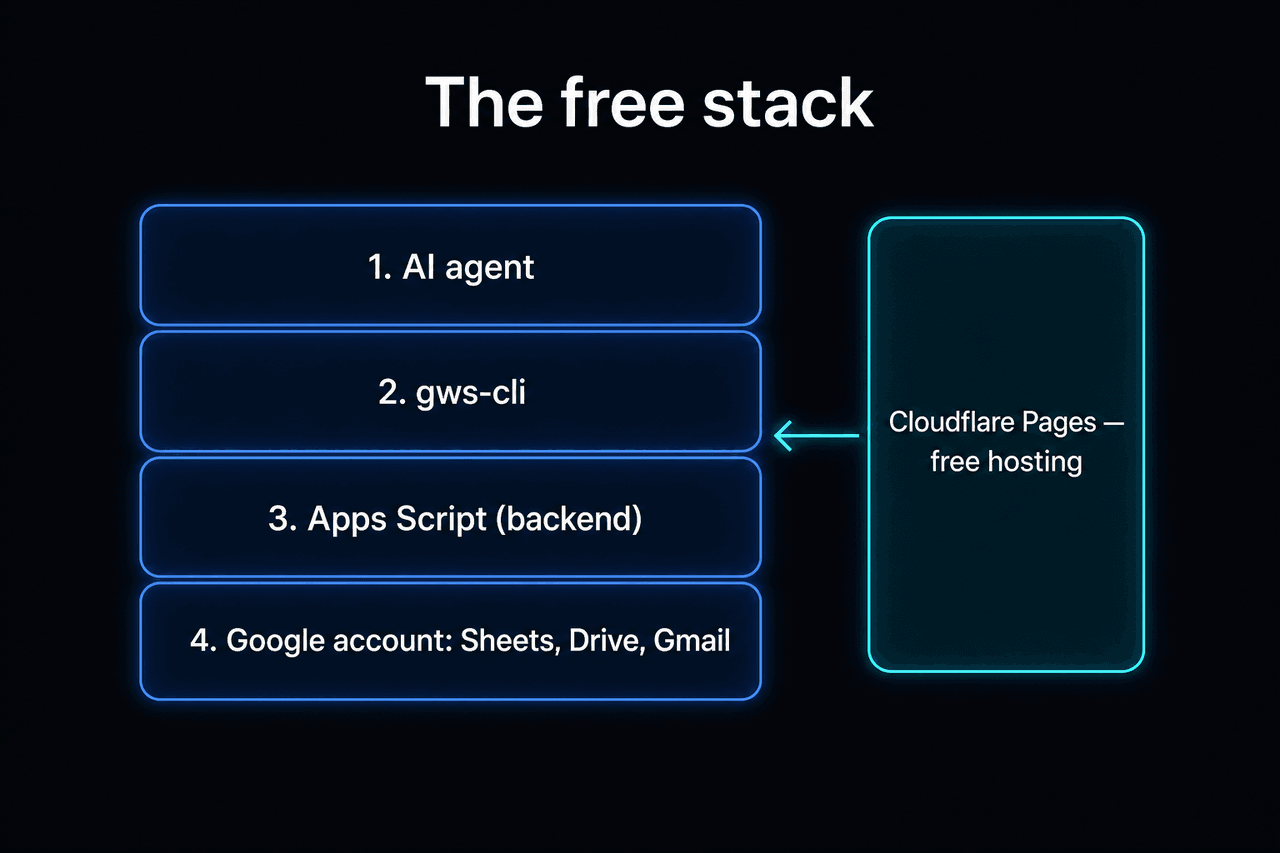
What you need (all free to start)
# Install in one go (assuming Node is already there)
npm install -g @google/clasp             # Apps Script CLI
npm install -D wrangler                   # Cloudflare CLI (per project)
npm install -g @anthropic-ai/claude-code  # AI agent (or @openai/codex)
npm install -g @googleworkspace/cli # gws — AI straight into Workspace- A Google account — Sheets, Drive, and Gmail are your database and backend.
- Node.js — the runtime for clasp and wrangler (
node -vto check; nodejs.org if missing). - clasp / wrangler / gws-cli (
gws) — deploy and Workspace access. - An AI coding agent — Claude Code or Codex. Not a chat app you copy-paste from, but an agent that edits files directly.
Official docs → clasp · Cloudflare Pages · Claude Code · Codex · gws-cli. Stuck installing? Hand the commands above straight to your AI agent and it sets them up.
A 5-minute example: form → sheet → alert email
Words are abstract, so let’s build one real tool end to end. A “contact form” to replace a Google Form — submit it and a row lands in a sheet and an alert email hits your inbox.
① The prompt you give the agent (paste as-is):
Build a contact form as an Apps Script web app. On submit, append one row (timestamp, name, email, message) to a sheet and send me an alert email. Then
clasppush it and deploy it as a web app.
② The code the agent writes (this is the whole thing):
// Code.gs
const SHEET_ID = "YOUR_SHEET_ID";        // the value between /d/ and /edit in the sheet URL
const NOTIFY_TO = "[email protected]";

function doGet() {
  return HtmlService.createHtmlOutputFromFile("index").setTitle("Contact form");
}

function submit(form) {
  const sheet = SpreadsheetApp.openById(SHEET_ID).getSheets()[0];
  sheet.appendRow([new Date(), form.name, form.email, form.message]);
  MailApp.sendEmail(NOTIFY_TO, "New inquiry: " + form.name, form.message);
  return "ok";
}
<!-- index.html -->
<form id="f">
<input name="name" placeholder="Name" required />
<input name="email" type="email" placeholder="Email" required />
<textarea name="message" placeholder="Message"></textarea>
<button>Send</button>
</form>
<script>
f.addEventListener("submit", (e) => {
e.preventDefault();
const form = Object.fromEntries(new FormData(e.target));
google.script.run.withSuccessHandler(() => alert("Got it!")).submit(form);
});
</script>③ Deploy:
clasp push        # local → Apps Script
clasp deploy      # issues the /exec web-app URL
Done. Open the /exec link on your phone and the form appears; submit it and rows pile up in the sheet and the email arrives. Zero servers, zero cost. That’s the smallest unit of “own a tool by vibe coding.” Everything else is making it prettier and more automatic.
Step 1: clasp — Apps Script as local code
npm i -g @google/clasp
clasp login                                   # Google OAuth (browser, once)
clasp create --type webapp --title "my-tool"  # new project → creates .clasp.json
# existing project: clasp clone <scriptId>
clasp push                                     # local → Apps Script
clasp deploy                                   # ship as a web app
Why it matters: the moment the code is a local file, the AI agent can read and edit it directly. Leave the web editor and version control, AI, and automation all snap on at once.
Step 2: Cloudflare — the front end, free
npm i -D wrangler
npx wrangler login
npx wrangler pages deploy dist --project-name=my-tool --branch=main
Run that last line and a https://my-tool.pages.dev URL prints right out. HTTPS automatic.
Why it matters: you rent no server. A static front end (or Pages Functions) runs inside Cloudflare’s free tier. That’s why hosting has no fixed cost. (What to upload and where → Stuck on localhost — now deploy it.)
Step 3: gws-cli — the AI reaches Workspace directly
gws reads Google’s Discovery Service at runtime and builds its commands dynamically. An AI agent (over MCP) talks straight to Sheets, Drive, and Gmail.
gws auth login              # Workspace auth
gws mcp -s sheets,drive     # the MCP server you hand the AI — only the services you need
Supported services: sheets · drive · gmail · calendar · docs · chat · admin.
Why it matters: with this, “read this sheet, tidy it, and draft an email” goes from code to execution in one shot. You don’t hand-write the glue code that joins the backend.
Step 4: the AI coding loop — “vibe coding”
The whole trick is small and often. Ask for everything at once and the AI stacks a pile of plausible code that doesn’t run.
- One feature per prompt. “Make the form” → check it works → “add email validation” → check → “add a spam filter”…
- Have the agent run
clasp push/wrangler deployitself. - When you’re stuck, paste the error message verbatim. The agent reads the cause and fixes it.
- Run it headless and it becomes a factory. This blog’s content pipeline is the example — manifest → AI draft → auto-deploy.
Tie it into auto-deploy (real code)
Drop one deploy line into package.json:
"scripts": {
  "deploy": "astro build && wrangler pages deploy dist --project-name=my-tool --branch=main"
}
Now npm run deploy builds and ships in one shot. To run it on a schedule, one cron line:
# crontab -e — deploy daily at 09:30
30 9 * * * cd ~/my-tool && npm run deploy >> ~/deploy.log 2>&1Traps (read before you start)
Where a human must stay in the loop
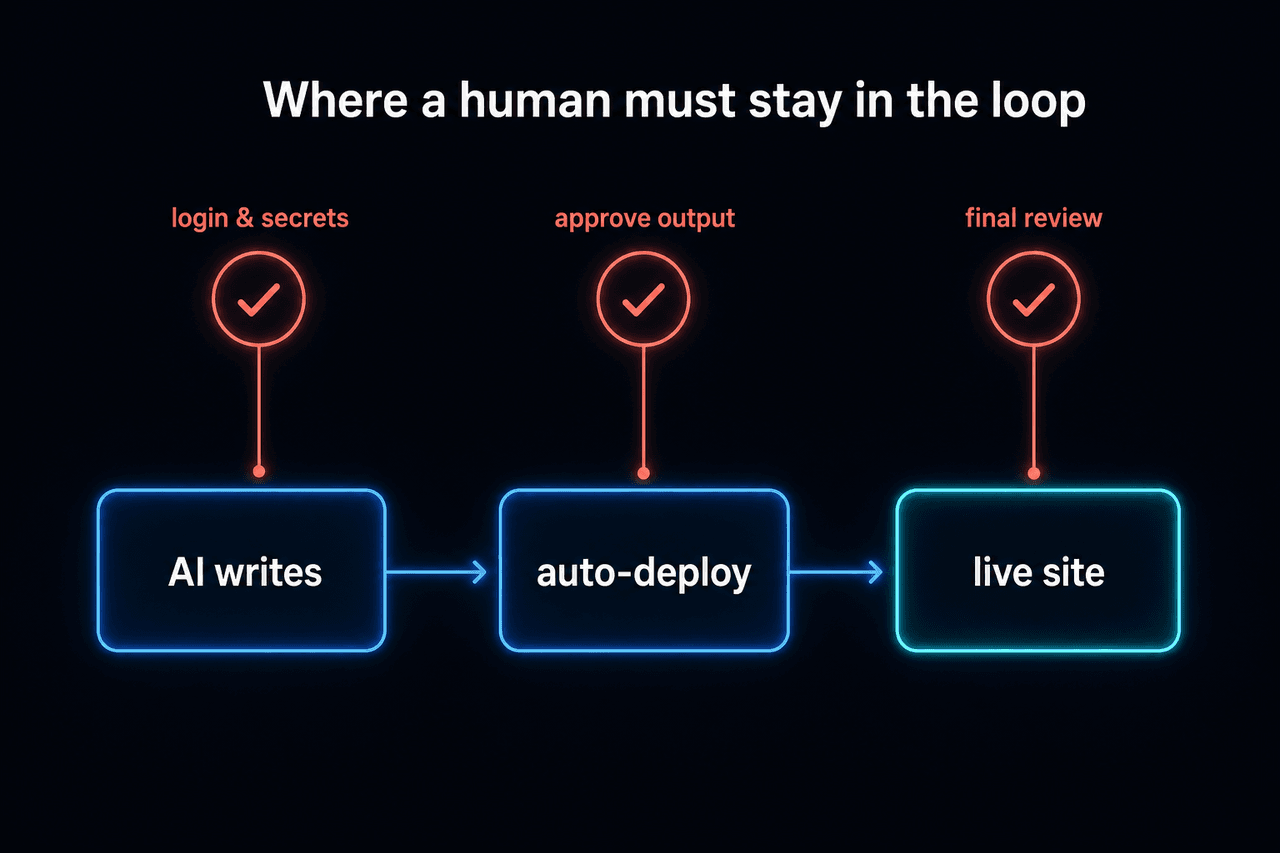
Some spots a person has to own, no matter how automated the rest is.
- Login and secret issuance —
clasp login,wrangler login,gws auth, key storage. Can’t be automated, and shouldn’t be. - Approving AI output — outbound email, amounts, and customer-facing replies get one human look.
- Safety and legal judgment — a system doesn’t stand in for a compliance call.
- Final deploy review — one look right before it goes live.
AI is fast at drafts and iteration; judgment and responsibility stay with a person. That one gate is what makes the factory trustworthy.
What it really costs (in numbers)
Here’s how far “zero” is actually true. (Exact figures shift by plan and date, so confirm in each dashboard.)
| Item | Free limit (rough) | When it costs money |
|---|---|---|
| Cloudflare Pages | static requests/bandwidth effectively unlimited, ~500 builds/month, ~100k Functions requests/day | dozens of builds a minute, or Functions traffic explodes |
| Apps Script (consumer) | 6 min/execution, ~90 min/day of triggers, ~100 emails/day | bulk sends, bulk processing, long jobs |
| AI calls | flat on a subscription | per-call on an API key — long documents, in bulk, on a top model (AI cost) |
A small personal tool almost always lands inside the free tier. Zero breaks when one of bulk, large scale, or premium AI shows up.
In one line
The AI writes, the CLI deploys, a human reviews. The clasp + Cloudflare + gws-cli + AI loop lets you mass-produce small tools at near zero cost — as long as login, secrets, approval, and safety judgment stay a human’s job.
Questions?
Hit a wall trying this yourself? Just ask. This blog runs on the very loop above, so point at the exact step you’re stuck on. Next steps → which tool to use · how to deploy what you built.
Frequently asked questions
- Can you really build and deploy this for free?
- Hosting runs inside Cloudflare's free tier and the backend runs in the Google account you already have, so small-scale work is near zero. The one exception is per-call AI usage: even if the AI writes the code, calling it costs money by volume, so decide the model, the volume, and whose key first.
- Do I need to know how to code?
- The AI agent writes the code, but a human still has to handle login, secret issuance, approving AI output, and the final deploy review. If you can follow commands and click through the result to verify it, you can start.
- What are clasp, wrangler, and gws-cli?
- clasp is the CLI that treats Google Apps Script as local code, wrangler is the CLI that deploys to Cloudflare for free, and gws-cli (gws) is a third-party CLI that lets an AI talk directly to Workspace APIs like Sheets, Drive, and Gmail. All three start free.
- Once I build it, does it keep deploying automatically?
- Put one npm script (build + wrangler deploy) on a cron and it deploys on schedule. But keep a human approval gate on anything that goes out — content, email, amounts — so a mistake doesn't ship live.